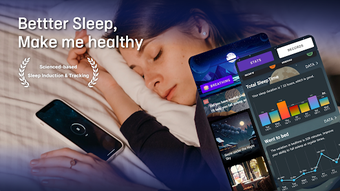

Download Sleep Tracker – Sleep Cycle, Health & Fitness, Android App
Overview
Sleep Tracker – Sleep Cycle is a free Android application designed to help users monitor and improve their sleep patterns. Positioned within the Health & Fitness category, the app focuses on tracking sleep duration, quality, and cycles to provide insights that may support better rest and daily performance. Its primary purpose is to assist individuals seeking to understand their sleep habits and make informed adjustments to their routines.
The app is suitable for general consumers interested in personal wellness, including students, professionals, and individuals managing stress or irregular sleep schedules. It operates on Android 13.0 or higher, indicating a focus on modern devices with updated system capabilities. The developer, AllThatMsg, has released version 1.0.5 as of April 12, 2024.
While no additional details about the developer’s background were provided, the app’s availability on Google Play suggests a public distribution model. Real-world usage scenarios include nightly sleep monitoring, morning reports, and tracking sleep trends over time. The app is designed for offline use, with data stored locally on the device.
The developer did not specify resource usage details.
Key Features & Capabilities
- Sleep Cycle Monitoring: The app tracks the duration and stages of sleep, including light, deep, and REM cycles, to provide a comprehensive overview of nightly rest.
- Daily Sleep Reports: Users receive visual summaries of their sleep patterns, helping them identify trends and potential disruptions.
- Smart Wake-Up Alarm: The app uses sleep cycle data to wake users during a light sleep phase, potentially reducing grogginess upon waking.
- Multilingual Support: Available in English and Korean, making it accessible to a broader user base.
- Lightweight Design: With a file size of 21.7 MB, the app is optimized for efficient storage and quick installation.
These features support users in developing healthier sleep routines. For example, the smart wake-up alarm can be particularly beneficial for individuals who need to wake up at a specific time but want to minimize morning fatigue. The daily reports allow users to spot recurring issues such as inconsistent bedtimes or insufficient deep sleep.
The lightweight nature of the app ensures it runs smoothly on devices with limited storage. The app does not require internet access to function, which enhances privacy and usability during sleep tracking. The developer did not provide details on advanced analytics or integration with third-party health platforms.
The app is free to download and use, with no in-app purchases or subscription tiers mentioned.
User Interface, Workflow & Performance
The user interface of Sleep Tracker – Sleep Cycle appears to be designed for simplicity and ease of use, catering to users who may not be tech-savvy. Navigation is likely intuitive, with core functions such as starting a sleep session, viewing reports, and adjusting settings accessible through a streamlined layout. The workflow begins with the user initiating a sleep log before bedtime, after which the app runs in the background to collect data.
Upon waking, users can review their sleep metrics through visual charts and summaries. The app is designed to minimize interruptions during sleep, ensuring it does not drain the device’s battery excessively. However, exact performance details were not specified.
The developer did not provide information on CPU or RAM usage, nor did they disclose stability metrics. Performance observations are based on general software behavior patterns for similar health applications. Users can expect a stable experience on compatible Android devices, but real-world performance may vary depending on device hardware and background processes.
The app is designed to operate efficiently without requiring constant user input.
Compatibility & System Requirements
Sleep Tracker – Sleep Cycle is compatible with Android 13.0 or higher, indicating it is optimized for recent Android versions. The app is available exclusively for Android devices, with no information provided about iOS or other platforms. The current version is 1.0.5, released on April 12, 2024.
The installation file size is 21.7 MB, which is relatively small and suitable for devices with limited storage. The developer did not specify additional hardware requirements such as RAM, processor type, or storage space beyond the file size. Compatibility information was partially provided, and no details were shared about supported screen sizes or device types.
Users should ensure their device meets the minimum Android version requirement to install and run the app. The app is available through Google Play, suggesting it adheres to platform-specific security and distribution standards.
Pros and Cons
Pros
- Free to download and use with no hidden costs
- Lightweight file size (21.7 MB) for efficient storage
- Supports both English and Korean languages
- Smart wake-up alarm to reduce morning grogginess
- Designed for offline use with local data storage
Cons
- Only available for Android, no support for iOS or other platforms
- Exact performance and resource usage details were not provided
- Limited information about advanced analytics or data export options
- Developer background and company details were not disclosed
- Only one version (1.0.5) listed, with no update frequency details
FAQ Section
Is Sleep Tracker – Sleep Cycle available for iOS?
The app is currently only available for Android devices. No information has been provided about future iOS compatibility.
Does the app require internet access to function?
Sleep Tracker – Sleep Cycle is designed to work offline. Data is stored locally on the device, and core features like sleep tracking and alarms operate without an internet connection.
Is the app secure and private?
The app does not require access to sensitive personal data beyond sleep patterns. Since it operates offline and stores data locally, it minimizes external exposure. However, no formal privacy policy or security certification was mentioned.
How often are updates released?
The latest version, 1.0.5, was released on April 12, 2024. No information was provided about the update frequency or release schedule.
Can I export my sleep data?
The developer did not specify whether data export or sharing options are available. Users should assume data remains stored locally unless otherwise indicated.
Final Thoughts
Sleep Tracker – Sleep Cycle offers a straightforward, no-cost solution for individuals looking to gain insight into their sleep habits. Its core features—sleep cycle monitoring, smart wake-up alarms, and daily reports—are well-suited for users seeking to improve sleep quality without complex setups. The app’s lightweight design and offline functionality enhance accessibility and privacy.
While the lack of detailed system requirements, performance data, and developer transparency may be a concern for some, the app’s free nature and availability on Google Play provide a low-risk entry point. It is best suited for Android users interested in personal health tracking who prefer simple, effective tools. For those seeking deeper analytics or cross-platform sync, additional research may be necessary.
Overall, Sleep Tracker – Sleep Cycle presents a solid option for basic sleep monitoring. Download Sleep Tracker now.







